
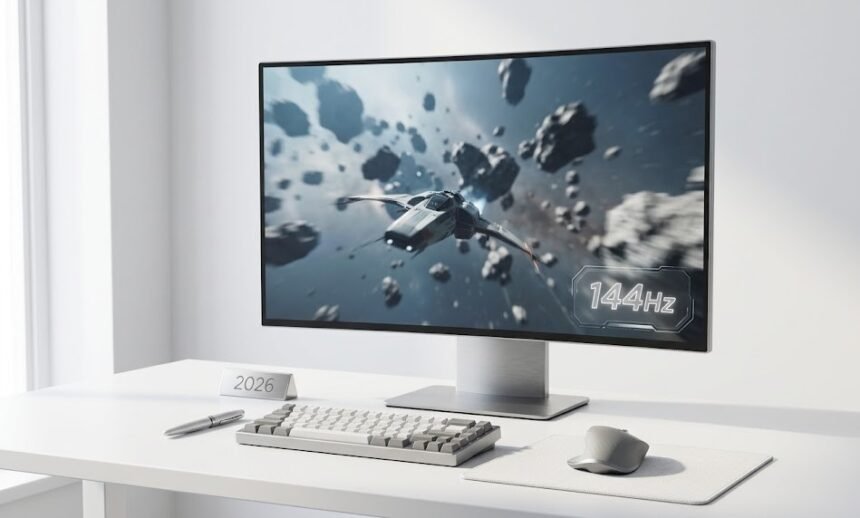
144Hz has gone from a luxury upgrade to the new standard in gaming monitors. But with 240Hz panels now at mainstream prices, is 144Hz still the right choice in 2026, or has it been left behind? This guide gives you a straight answer based on who you are and how you play.
How 144Hz Fits Into the 2026 Monitor MarketWhy Smoothness Perception Matters More Than Raw Numbers144Hz for Casual and Everyday GamersBest Use Cases for Casual Gamers144Hz for Competitive GamersSystem Latency Improvement by Refresh RateHardware Requirements for 144Hz GamingPanel Quality Matters as Much as Refresh RatePanel Types ExplainedWhen 144Hz Is Not Worth BuyingBefore Buying: Practical ChecklistFinal Verdict: Should You Buy a 144Hz Monitor in 2026?
How 144Hz Fits Into the 2026 Monitor Market
When 144Hz monitors first appeared in the early 2010s, they were niche products with steep price premiums. Today, the market looks completely different. 240Hz panels are mainstream. 360Hz and 500Hz models exist for esports professionals. OLED gaming monitors with response times under 0.1ms are widely available at accessible prices.
Despite all of that, 144Hz has not been made obsolete. It has become the baseline, the point at which every gamer should start when choosing a gaming monitor.
Why Smoothness Perception Matters More Than Raw Numbers
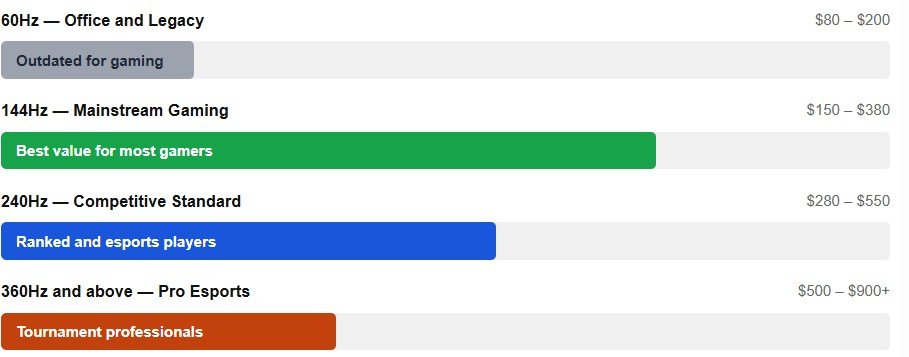
Refresh rate improvements do not scale linearly with how smooth things actually feel. Human vision perceives the jump from 60Hz to 144Hz as dramatic. It is immediately obvious the first time you use a 144Hz monitor that scrolling, cursor movement, and fast-moving game content all feel noticeably more responsive and fluid.
Moving from 144Hz to 240Hz delivers a real but much smaller improvement. Moving from 240Hz to 360Hz is even more subtle. Each step delivers diminishing returns, which is exactly why 144Hz remains such a strong value; it captures the majority of the perceptible smoothness benefit without the cost of higher-tier panels.
Test
Spend one week using a 144Hz monitor, then switch back to 60Hz. Almost every user finds 60Hz immediately uncomfortable, sluggish, stuttery, and harder to track moving objects. That reaction alone shows how large the jump from 60Hz to 144Hz actually is.
144Hz for Casual and Everyday Gamers
If you browse the web, watch videos, work in office applications, and play single-player or casual multiplayer games, 144Hz is an easy recommendation. Smoothness improvements are visible in everyday tasks, not just in fast-paced games. Window dragging, page scrolling, and cursor movement all feel noticeably better.
Pricing is also highly reasonable. Solid 1080p 144Hz monitors are available at entry-level prices, and 1440p models have dropped significantly. Almost any modern GPU, including mid-range and integrated graphics in newer laptops, can drive a 144Hz panel at 1080p without difficulty.
Best Use Cases for Casual Gamers
| Use Case | Why 144Hz Works Well |
|---|---|
| Single-Player Games | Open-world RPGs, adventure games, and story-driven titles feel smoother and more immersive at 144Hz, even without competitive gameplay. |
| Everyday PC Use | Web browsing, scrolling, window movement, and desktop interaction feel noticeably faster and more responsive during daily use. |
| Casual Multiplayer | Games like Minecraft, Fortnite casual mode, and co-op titles run smoothly at 144Hz without needing extremely high refresh rates. |
| Video and Streaming | 60fps YouTube videos, sports clips, and game trailers appear very smooth, while standard 24fps movies show little difference compared to 60Hz. |
144Hz for Competitive Gamers
For competitive multiplayer, the answer gets more nuanced. Research alongside NVIDIA Reflex demonstrated that higher frame and refresh rates produce measurable improvements in aim accuracy and reaction time. These improvements continue beyond 144Hz, 240Hz delivers further reductions in system latency that are statistically meaningful at high skill levels.
If you play Counter-Strike 2, Valorant, or Apex Legends at a ranked or semi-professional level, 240Hz is the stronger choice in 2026. Prices on high-quality 240Hz panels have dropped enough to overlap with premium 144Hz models, narrowing the cost justification gap significantly.
System Latency Improvement by Refresh Rate
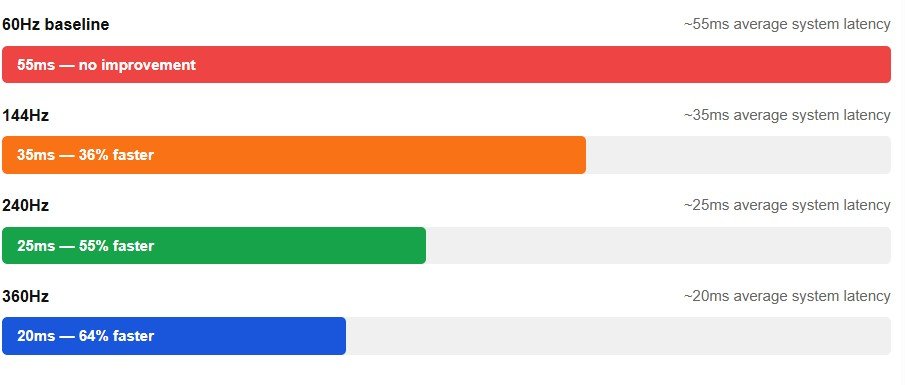
That said, 144Hz is far from obsolete for competitive play. It is dramatically better than 60Hz. The visual difference between 144Hz and 240Hz is subtle, far smaller than what you notice going from 60Hz to 144Hz. If the budget does not allow 240Hz, 144Hz remains a genuinely competitive choice.
Key insight
Nearly all of competitive gaming’s perceivable improvement over 60Hz is captured at 144Hz. Moving to 240Hz is a refinement, moving from 60Hz to 144Hz is a transformation.
Hardware Requirements for 144Hz Gaming
Hitting 144 FPS consistently requires a capable GPU. Resolution dramatically affects what hardware you need. Modern upscaling tools like NVIDIA DLSS and AMD FidelityFX Super Resolution make hitting 144 FPS at higher resolutions far more achievable without sacrificing visible image quality — both are now standard in most major game releases.
| Resolution | GPU Tier Needed | Upscaling | Is 144Hz Realistic? |
|---|---|---|---|
| 1080p | Mid-range GPU from the last two generations | Optional | Yes, easily achievable in most games |
| 1440p | Upper mid-range GPU | Recommended | Yes, especially with DLSS or FSR enabled |
| 4K | High-end GPU required | Required | Difficult in newer AAA titles without aggressive optimization |
Before buying any monitor
Check your actual in-game frame rate using built-in counters. If you consistently hit 100 to 140 FPS in your most-played titles, a 144Hz panel will transform your experience. If you struggle to hit 60 FPS, upgrading your GPU first and monitor second delivers more value for money.
Panel Quality Matters as Much as Refresh Rate
Refresh rate is only one dimension of monitor quality. Panel type, pixel response time, contrast ratio, and motion clarity all significantly affect real-world image quality. A cheap 144Hz panel with slow pixel response can still produce visible motion blur. A premium OLED 144Hz monitor can look substantially better than a budget 240Hz IPS in motion and contrast for many users.
Panel Types Explained
| Panel Type | Main Strengths | Best For | Drawbacks |
|---|---|---|---|
| IPS Panels | Excellent colour accuracy and wide viewing angles | Gaming, content creation, and balanced everyday use at 144Hz | Lower contrast compared to VA and OLED panels |
| OLED Panels | Best contrast levels and extremely fast pixel response times, often under 0.1ms | Premium gaming experience with unmatched motion clarity | Higher price and potential burn-in concerns |
| VA Panels | Strong static contrast ratio with deep blacks | Dark-room gaming and immersive single-player experiences | Slower response times than IPS and OLED panels |
Always check independent measured response time data from sources like RTINGS before purchasing. Manufacturer spec sheets often reflect best-case figures that do not match real-world performance.
When 144Hz Is Not Worth Buying
There are specific situations where spending on a 144Hz monitor makes little sense. Be honest with yourself about which category you fall into.
| Situation | Why 144Hz May Not Be Worth It |
|---|---|
| GPU cannot consistently reach high frame rates | If your system only runs games at around 60–80 FPS, a 144Hz monitor cannot fully deliver smooth 144Hz gameplay. Upgrading the GPU first often makes more sense. |
| PC is mainly used for movies and office work | Standard video content usually runs at 24fps or 60fps, so the visual difference between 60Hz and 144Hz is minimal for non-gaming tasks. |
| Professional competitive gaming focus | Serious esports players may benefit more from 240Hz or higher monitors because of the lower input latency and faster motion handling. |
| Very limited budget | Spending extra money on a stronger graphics card generally improves gaming performance more than upgrading refresh rate alone. |
Before Buying: Practical Checklist
| Step | What to Do | Why It Matters |
|---|---|---|
| 1. Check actual in-game FPS | Use in-game frame counters in the titles you play most often. | Consistently reaching 100+ FPS means you will benefit noticeably from a 144Hz monitor. |
| 2. Choose resolution first | Pick 1080p for budget builds, 1440p for balanced value, and 4K only with powerful hardware. | Resolution directly affects GPU performance and achievable frame rates. |
| 3. Match panel type to your use case | Choose IPS for balanced gaming, OLED for premium motion clarity, or VA for deep contrast in dark environments. | Different panel technologies prioritize different visual strengths and gaming experiences. |
| 4. Confirm adaptive sync compatibility | Check whether the monitor supports G-Sync, FreeSync, or both with your graphics card. | Adaptive sync reduces screen tearing and improves smoothness during gameplay. |
| 5. Read measured panel reviews before buying | Look at trusted review sites like RTINGS for tested response times and motion performance. | Manufacturer specifications often reflect ideal conditions rather than real-world results. |
Final Verdict: Should You Buy a 144Hz Monitor in 2026?
In 2026, a 144Hz monitor is no longer considered a luxury upgrade reserved for enthusiasts. It has become the practical mainstream standard for modern gaming and smooth everyday computing. For most users, it offers the best balance between price, performance, motion clarity, and hardware requirements.
If you are still using a 60Hz monitor, the jump to 144Hz is immediately noticeable. Mouse movement feels smoother, games respond faster, animations appear cleaner, and general desktop use becomes more fluid. It is one of the few hardware upgrades that most people can genuinely feel within minutes.
For casual gamers and everyday PC users, a quality 144Hz monitor is an easy recommendation. Whether you play open-world games, co-op titles, racing games, or browse the web and watch videos, the smoother refresh rate improves the overall experience without requiring extreme hardware.
Players who mainly enjoy single-player and story-driven games will also benefit greatly from 144Hz. The added smoothness enhances immersion, especially in open-world environments and fast camera movement. For this style of gaming, moving from 144Hz to 240Hz usually provides only small real-world gains at a higher cost.
For competitive multiplayer gamers at a mid- or advanced-level, 144Hz remains highly capable in 2026. Fast shooters, MOBAs, and battle royale games feel significantly more responsive at 120Hz than at 60Hz. However, players competing seriously in ranked esports environments may want to consider 240Hz displays, particularly now that the price gap between premium 144Hz and entry-level 240Hz monitors has narrowed.
The most important factor is balancing your monitor with your hardware. A 144Hz display only shows its full advantage when your PC can consistently produce high frame rates. If your GPU struggles to push above 60–80 FPS in modern games, upgrading the graphics card may improve your experience more than upgrading the monitor alone.
For most people, though, 144Hz remains the sweet spot. It delivers smooth gameplay, strong visual clarity, wide panel choices, and reasonable hardware requirements without entering the expensive territory of ultra-high-refresh esports displays.
A good 144Hz monitor paired with capable hardware still provides one of the best overall gaming and PC experiences available in 2026, smooth, responsive, modern, and likely to remain relevant for many years ahead.
Disclaimer: This article is for informational and educational purposes only. Frame rate, refresh rate, and hardware performance vary by device, drivers, operating system, and workload. Latency figures are approximate and based on published third-party research. Brand names and products mentioned are property of their respective owners and are referenced for clarity only. Verify all specifications with your device manufacturer before making purchasing decisions.