Test your device’s frame rate (FPS) and refresh rate online with our free Frame Rate Test tool. Measure FPS, monitor Hz, smoothness, and performance instantly.
Your device’s full performance profile ·
Your device’s rendering capability scored across frame rate, stability, frame pacing, and refresh utilisation.
Before you can speed up your screen, it helps to know what is actually moving. Let us slow it down and look at how every smooth moment on your display is built, one tiny frame at a time.
Look at your screen right now. It feels like a single, continuous image. It is not. Your display is redrawing the entire picture dozens of times every second, and each of those rapid redraws is a frame. The speed at which they happen is your frame rate, measured in FPS (frames per second).
More frames per second means less time between updates, and your brain stops noticing the gaps. At 24 FPS you get the cinematic feel of film. At 60 FPS, scrolling and motion feel smooth and snappy. At 144 FPS, fast camera turns stay crisp and your hands feel like they are moving the second you think about it. Lower numbers look choppy, and in fast games, choppy means slow reaction time.
Here is the part most people miss. Your FPS does not come from one part of your computer. It is a team effort. Your GPU has to render fast, your CPU has to keep up, and your monitor has to actually show what they produce. The weakest member of that team sets the ceiling for everything.
Movies have looked great at 24 FPS for over a century. But movies are not interactive. The moment you add a mouse or a controller, every dropped frame becomes a delay you can feel. That is why games need so much more.
This is where the numbers come alive. While the test runs, every frame your browser draws gets measured, charted, and explained. No spreadsheets, no exports, just a clear picture of how your device is performing right now.
Numbers in isolation are hard to read. Is 90 FPS good? Bad? Average? Here is where your result lands against real-world hardware tiers. You will see, at a glance, where your device fits and what kind of build delivers what you have.
A score on its own does not mean much. We pair your number with a clear breakdown of what is working and what is not, so you actually know what to do with the result. Share it, save it, or run the test again to chase a higher score.
Your device is rendering at competitive gaming levels with strong stability and minimal stuttering across the test.
Averaging 142 FPS at 92% stability puts you firmly in the upper tier. Your GPU has clear headroom and your display is being used to its potential. If you have a 144Hz monitor or higher, you are getting close to a perfect match.
Live FPS comparison
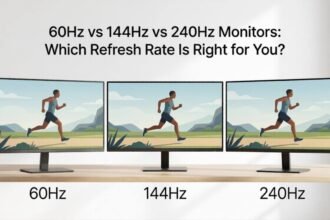
Each ball moves at its real frame rate. Watch the difference in motion smoothness between 240, 144, 120, 60, and 30 FPS, side by side.
What each frame rate actually means
Numbers are easy to compare. Feel is harder. Here is what each tier in the race above translates to in plain language, written for normal people who want to know if their setup is good enough.
Learn how to measure, analyse, and improve your display performance using our Frame Rate Test. No technical jargon, just a clear walk-through in plain English that gets you from open browser to real answers in about a minute.
Get accurate FPS data across every device, browser, and monitor you own. Same test, same scale, every time.
Learn what each number actually means and what kind of experience they translate to in real games and video.
Use the insights to boost stability, fix stutters, and unlock the smooth motion your hardware is capable of.
Compare results over time and after tweaks. See exactly what worked and what did not, in numbers you can trust.
Four simple steps from open tab to honest results. The whole thing takes less than two minutes the first time you do it.
Four key numbers and what each one actually means in plain language.
If your numbers look off, one of these is almost certainly the cause. Each row shows the symptom, what it actually means, and what to try first.
Two numbers. Two jobs. One smooth experience. Here is the plain-English breakdown of what each one actually does, why the difference matters, and how to know which one is holding your setup back.
Frame rate (FPS) is how many frames your computer creates each second.
Refresh rate (Hz) is how many times your monitor updates the image each second.
Best experience happens when FPS is close to Hz.
Your computer creates the frames. Your monitor displays them. Both halves need to keep up with each other for the experience to feel smooth.
The experience you actually get depends on how well the two numbers match. Here are the three situations you will run into.
Both FPS and Hz tend to land on the same handful of common values. Here is what each tier represents in real life.
| Tier | Frame Rate (FPS) | Refresh Rate (Hz) |
|---|---|---|
| 60 | Standard for everyday use, basic gaming, and office work. | Most laptops, office displays, and entry-level TVs. |
| 120 | Console flagship Performance Mode targets and modern phones. | PS5 and Xbox Series X output, mid-range gaming monitors. |
| 144 | The esports sweet spot, used by most competitive players. | The most popular gaming monitor refresh rate sold today. |
| 240 | Pro-level FPS for twitch shooters and fast-paced esports. | Premium competitive gaming monitors and OLED panels. |
Everything laid out so you can see every difference at a glance. Same row, two answers, one for each side.
| Aspect | Frame Rate | Refresh Rate |
|---|---|---|
| What it measures | Images your computer creates per second. | Times your monitor redraws per second. |
| Who does the work | Graphics card and processor. | The monitor itself. |
| Does it change | Yes, constantly goes up and down. | No, stays fixed and steady. |
| How to improve it | Better graphics card, lower settings. | Buy a monitor with a higher Hz rating. |
| Measured in | FPS, frames per second. | Hz, hertz. |
| Simple role | The sender, makes the frames. | The receiver, displays the frames. |
Three of the most common issues, what each one really means, and exactly what to try first to fix it.
Search our help center or browse topics to get the most out of your gaming performance.
Try a different keyword, or browse all topics instead.
Solve common performance problems and get back to smooth gameplay.
Run the FPS Test to measure your FPS, frame time, and system performance in seconds.
Explore helpful guides, performance tips, and testing tutorials for FPS, display, mouse, keyboard, and gaming setup improvements.
Sign in to your account