
info@frameratetest.net New York, NY
100% Free No Sign-Up No Download
Frame Rate Test
Home
All Free Testing Tools 13 Tools
Frame Rate TestLive FPS graph and stress test
FPS TestTimed sessions, 1% Low, frame time
Refresh Rate TestAuto-detects Hz, up to 360 Hz
Mouse Polling Rate TestHz measurement, 8000 Hz support
Mouse DPI AnalyzerTrue DPI with deviation analysis
Mouse Scroll Wheel TestScroll direction and step accuracy
Keyboard TesterEvery key, ghosting detection
Spacebar ClickerCPS test, 6 timer modes
Gamepad TesterButtons, sticks, drift, vibration
Dead Pixel TestSolid color screens to find pixels
Dead Pixel FixerRapid color cycling repair tool
Display TestColor, gradient, uniformity check
Screen Bleeding TestBacklight bleed and IPS glow
All tools free, no download required Browse all
Display Tools
Frame Rate TestLive FPS graph with stress levels
FPS TestAdvanced session benchmark
Refresh Rate TestAuto Hz detection, up to 360 Hz
Dead Pixel TestFind stuck and dead pixels
Dead Pixel FixerColor cycling repair tool
Display TestColor, gradient and uniformity
Screen Bleeding TestIPS glow and backlight bleed
Mouse Tools
Mouse Polling Rate TestHz, consistency, live graph
Mouse DPI AnalyzerTrue DPI, 4-axis deviation
Mouse Scroll Wheel TestScroll direction and step check
Keyboard and Input
Keyboard TesterAll keys, ghost key detection
Spacebar ClickerCPS test, 6 timer modes
Gamepad TesterButtons, sticks, drift, vibration
Company
About UsOur story, mission, and team
Contact UsGet in touch with our team
Content
BlogArticles and hardware guides
GuidesHow-to guides and tutorials
Blog
Run FPS Test
Quick: FPS Test Refresh Rate Blog
Frame Rate Test
100% Free No Sign-Up No Download
Performance
Frame Rate TestLive FPS graph and stress test FPS TestTimed sessions, 1% Low Refresh Rate TestAuto Hz detection
Mouse Tools
Mouse Polling Rate TestHz measurement, live graph Mouse DPI AnalyzerTrue DPI with deviation Mouse Scroll Wheel TestScroll direction and steps
Keyboard and Input
Keyboard TesterAll keys, ghosting detection Spacebar ClickerCPS test, 6 timer modes Gamepad TesterButtons, sticks, drift, rumble
Display Tools
Dead Pixel TestFind stuck and dead pixels Dead Pixel FixerColor cycling repair tool Display TestColor, gradient, uniformity Screen Bleeding TestBacklight bleed and IPS glow
Company
About Us Contact Us Blog Guides
Contact info@frameratetest.net
Run FPS Test Now
By using this site, you agree to the Privacy Policy and Terms of Use.
Accept
info@frameratetest.net New York, NY
100% Free No Sign-Up No Download
Frame Rate Test
Home
All Free Testing Tools 13 Tools
Frame Rate TestLive FPS graph and stress test
FPS TestTimed sessions, 1% Low, frame time
Refresh Rate TestAuto-detects Hz, up to 360 Hz
Mouse Polling Rate TestHz measurement, 8000 Hz support
Mouse DPI AnalyzerTrue DPI with deviation analysis
Mouse Scroll Wheel TestScroll direction and step accuracy
Keyboard TesterEvery key, ghosting detection
Spacebar ClickerCPS test, 6 timer modes
Gamepad TesterButtons, sticks, drift, vibration
Dead Pixel TestSolid color screens to find pixels
Dead Pixel FixerRapid color cycling repair tool
Display TestColor, gradient, uniformity check
Screen Bleeding TestBacklight bleed and IPS glow
All tools free, no download required Browse all
Display Tools
Frame Rate TestLive FPS graph with stress levels
FPS TestAdvanced session benchmark
Refresh Rate TestAuto Hz detection, up to 360 Hz
Dead Pixel TestFind stuck and dead pixels
Dead Pixel FixerColor cycling repair tool
Display TestColor, gradient and uniformity
Screen Bleeding TestIPS glow and backlight bleed
Mouse Tools
Mouse Polling Rate TestHz, consistency, live graph
Mouse DPI AnalyzerTrue DPI, 4-axis deviation
Mouse Scroll Wheel TestScroll direction and step check
Keyboard and Input
Keyboard TesterAll keys, ghost key detection
Spacebar ClickerCPS test, 6 timer modes
Gamepad TesterButtons, sticks, drift, vibration
Company
About UsOur story, mission, and team
Contact UsGet in touch with our team
Content
BlogArticles and hardware guides
GuidesHow-to guides and tutorials
Blog
Run FPS Test
Frame Rate Test
Performance Frame Rate Test FPS Test Refresh Rate Test
Mouse Tools Mouse Polling Rate Test Mouse DPI Analyzer Mouse Scroll Wheel Test
Keyboard and Input Keyboard Tester Spacebar Clicker Gamepad Tester
Display Tools Dead Pixel Test Dead Pixel Fixer Display Test Screen Bleeding Test
Company About Us Contact Us Blog Guides
Contact info@frameratetest.net 77 Sands Street, 6th Floor, New York, NY 11201
Run FPS Test Now
Frame Rate TestFrame Rate Test
Aa
Search
Have an existing account? Sign In
Follow US
FPS Basics & Guides

What Is FPS? A Complete Beginner’s Guide to Frames Per Second

Team Frame Rate Test
Last updated: 2026/05/06 at 2:30 PM
Team Frame Rate Test 8 Min Read
Share
What Is FPS?

If you have ever watched a video that looked smooth as butter or played a game that felt frustratingly choppy, you have already experienced the impact of FPS. Short for frames per second, FPS is one of the most important numbers in modern displays, gaming, and content creation. Yet most people never stop to learn what it actually means or why it controls so much of how a screen feels to use.

Contents
What Does FPS Actually MeasureWhy Higher FPS Looks SmootherCommon FPS Standards You Will Encounter24 FPS30 FPS60 FPS120 FPS and 144 FPS240 FPS and AboveFPS vs Refresh RateHow to Test Your Own Frame RateWhat FPS Should You Aim ForConclusionDisclaimer

This guide breaks down FPS in plain language. You will learn what a frame really is, how your eyes perceive motion, why some frame rates feel smoother than others, and what numbers you should aim for depending on what you do on your device. By the end, you will know enough to test your own screen with confidence and judge whether your hardware is keeping up with your needs.

What Does FPS Actually Measure

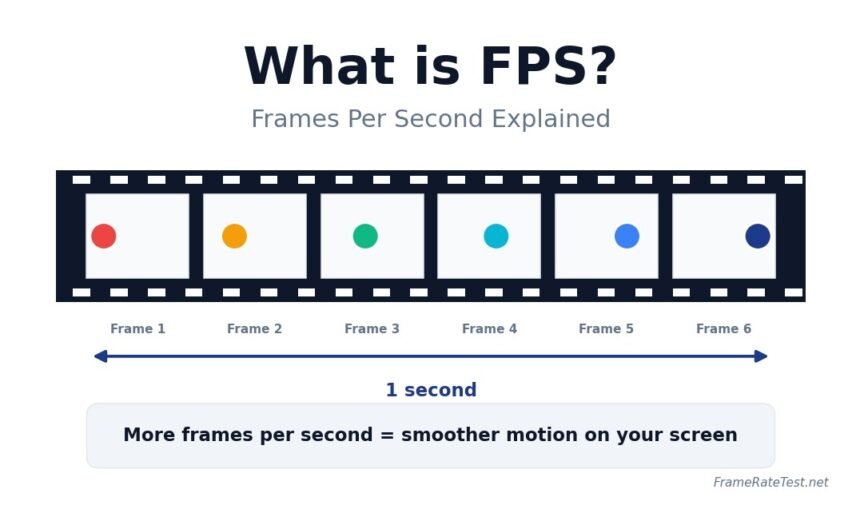
FPS measures how many individual still images, called frames, your screen displays in one second. Each frame is a complete picture, and when many of them are shown rapidly in sequence, your brain blends them to create the illusion of motion. This is the same principle behind classic flipbooks, except modern devices can produce dozens or hundreds of frames every single second.

The concept dates back to the earliest days of film. Early silent movies were typically projected at around 16 frames per second, while modern cinema standardized on 24 frames per second. You can read more about the history of frame rate standards on the Wikipedia overview of frame rate. Television, gaming, and online video have since pushed those numbers far higher to deliver smoother motion.

Why Higher FPS Looks Smoother

Higher FPS means smaller gaps between each frame. When the gap is small, motion appears continuous. When the gap is large, the eye notices the jumps, and the result feels stuttery or choppy. At 30 FPS, an object on screen moves a noticeable distance between frames. At 120 FPS, the same object moves only a quarter of that distance per frame, which the brain reads as fluid motion.

There is also a responsiveness benefit. In an interactive scenario like a video game, every new frame is a fresh chance for the screen to reflect your input. A higher FPS means less time between when you click or tap and when you see the result. That is why competitive gamers chase high frame rates so aggressively.

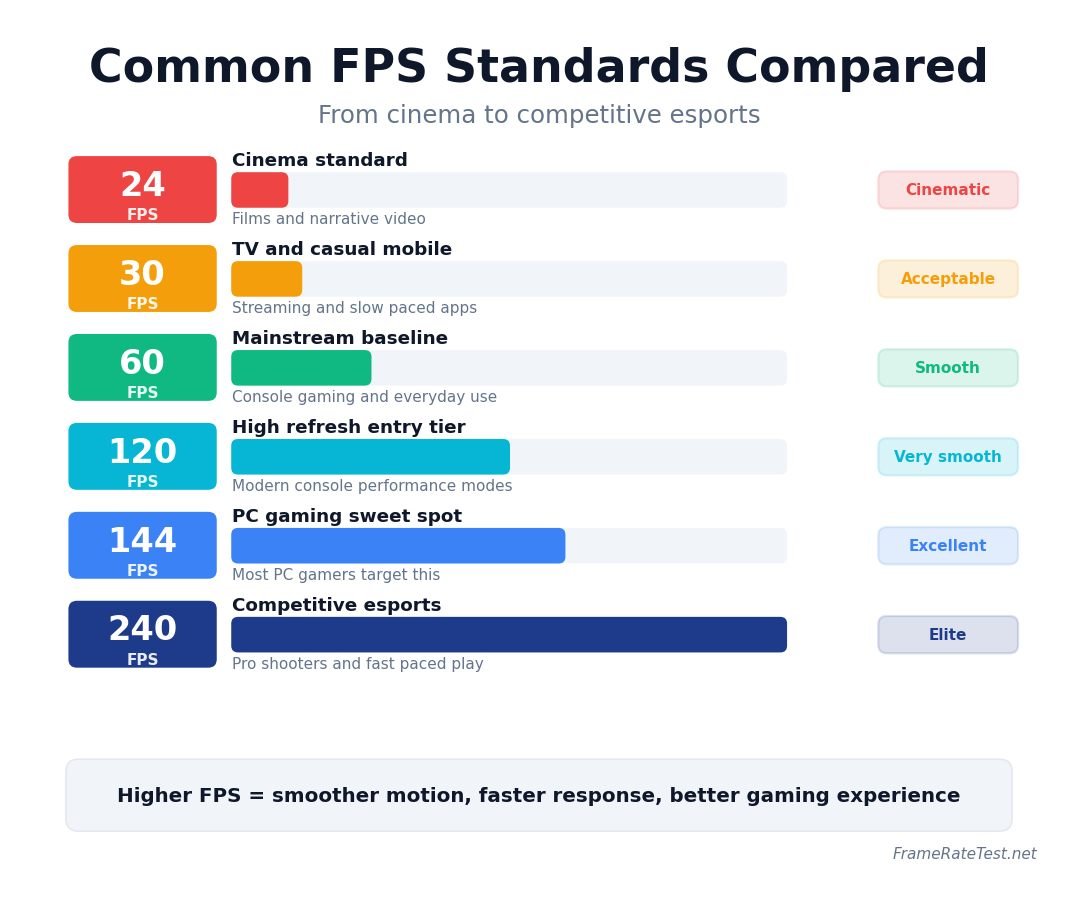
Common FPS Standards You Will Encounter
Common FPS Standards You Will Encounter

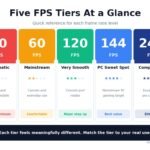
24 FPS

The classic cinema standard. It produces a soft, dreamlike motion that audiences associate with film. It is fine for narrative video, but it feels sluggish for anything interactive.

30 FPS

Common in television broadcasting, streaming video, and casual mobile games. Acceptable for slow-paced content, but visibly choppy for fast action.

60 FPS

The gold standard for general computer use, console gaming, and most online video. Almost every desktop monitor refreshes at least 60 times per second, so 60 FPS pairs perfectly with mainstream hardware.

120 FPS and 144 FPS

The starting point for high refresh rate gaming. Motion looks dramatically more fluid, scrolling feels lighter, and aiming in shooters becomes noticeably more precise.

240 FPS and Above

Used by competitive esports players who want every possible advantage. The improvements over 144 FPS are subtle but real, especially for fast camera movement in titles like Counter-Strike, Valorant, and Apex Legends.

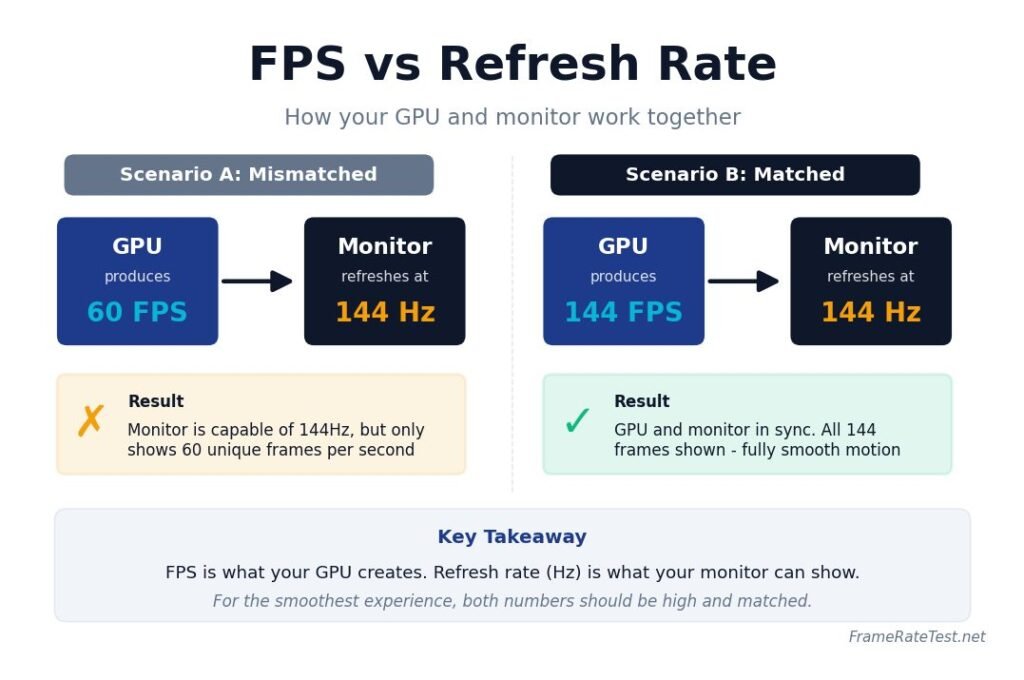
FPS vs Refresh Rate
FPS vs Refresh Rate

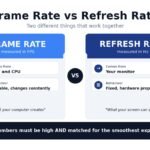
Your graphics hardware and processor generate FPS, while refresh rate is the speed at which your display can update, measured in hertz (Hz). A 144Hz monitor can show up to 144 different frames per second, but only if your hardware is producing them. If your game runs at 60 FPS on a 144Hz screen, you only get 60 unique frames per second on screen. Display experts at RTINGS explain this relationship in greater technical detail, and it is one of the most important pairings to understand when buying a new display.

How to Test Your Own Frame Rate

The easiest way to check your FPS is with a browser-based tool. You do not need to install anything, and you can compare different devices in seconds. Our own frame rate test on FrameRateTest.net measures how many frames your browser renders per second and lets you stress test your display by adjusting motion speed and visual elements. Run it on your phone, your laptop, and your desktop to see how each device performs.

For deeper diagnostics inside actual games, tools like the built-in Steam FPS counter or NVIDIA’s overlay are more accurate because they measure frames coming directly from the game engine. NVIDIA documents this clearly in their system latency optimization guide, which also explains how frame rate ties into input lag.

What FPS Should You Aim For

There is no single right answer. For watching movies and YouTube, anywhere from 24 to 60 FPS is fine. For everyday computer use, 60 FPS feels comfortable. For console gaming, 60 FPS is the modern target, and many newer games offer 120 FPS modes. For competitive PC gaming, anything above 144 FPS is ideal, and serious esports players often aim for 240 FPS or more on a matching high refresh rate monitor.

Conclusion

FPS is more than just a number. It controls how smooth, responsive, and immersive your screen feels in everything from movies to multiplayer games. Once you understand what it measures, you can make informed decisions about your hardware, your settings, and the content you consume. Run a quick frame rate test on your own device today, compare the result to your monitor refresh rate, and you will instantly know whether your setup is performing the way it should.

Disclaimer

This article is provided for informational and educational purposes only. Frame rate, refresh rate, and hardware performance can vary widely depending on your device, drivers, browser, operating system, and background workload. Results from any browser-based testing tool, including the one on this site, are approximate and should be treated as a guideline rather than a precise hardware benchmark. Brand names, software, and products mentioned are the property of their respective owners and are referenced only for clarity. Always confirm settings and specifications with your device manufacturer before making purchasing or hardware decisions.
Share This Article
Facebook Twitter Email Copy Link Print
By Team Frame Rate Test
Follow:
Team Frame Rate Test: A dedicated group of gaming performance experts testing FPS, displays, and hardware to help gamers play smoother.
Previous Article Frame Rate vs Refresh Rate Frame Rate vs Refresh Rate: Real Difference Explained
Next Article 30 FPS vs 60 FPS vs 120 FPS vs 144 FPS vs 240 FPS Compared 30 FPS vs 60 FPS vs 120 FPS vs 144 FPS vs 240 FPS Compared
Leave a comment Leave a comment

Leave a Reply Cancel reply

Your email address will not be published. Required fields are marked *

Most Popular

A Memoir of Soccer, Grit, and Leveling the Playing Field
10 Super Easy Steps to Your Dream Body 4X
Mind Gym : An Athlete's Guide to Inner Excellence
Mastering The Terrain Racing, Courses and Training
Is 144Hz Worth It in 2026? Honest Guide for Every Gamer

Is 144Hz Worth It in 2026? Honest Guide for Every Gamer

By Larry Lyons Gaming & Tech Reviewer

Subscribe Now

Subscribe to our newsletter to get our newest articles instantly!

[mc4wp_form]

30 FPS vs 60 FPS vs 120 FPS vs 144 FPS vs 240 FPS Compared

2 weeks ago

PC Gaming FPS Optimization Guide

2 weeks ago

You Might Also Like

How to Check Your FPS on Windows, Mac, PlayStation, Xbox, Android, and More
FPS Basics & Guides

How to Check Your FPS on Windows, Mac, PlayStation, Xbox, Android, and More

2 weeks ago
Why Is My FPS Dropping? 10 Common Causes and How to Fix Them
FPS Basics & Guides

Why Is My FPS Dropping? 10 Common Causes and How to Fix Them

2 weeks ago
PC Gaming FPS Optimization Guide
FPS Basics & GuidesGaming Performance

PC Gaming FPS Optimization Guide

2 weeks ago
Frame Rate vs Refresh Rate
FPS Basics & Guides

Frame Rate vs Refresh Rate: Real Difference Explained

2 weeks ago
Frame Rate Test — Free FPS, Monitor and Mouse Testing Tools

Test your device’s frame rate (FPS) and refresh rate online with our free Frame Rate Test tool. Measure FPS, monitor Hz, smoothness, and performance instantly.

100% Free No Install All Devices No Sign-Up
Email Us info@frameratetest.net
Our Office
77 Sands Street, 6th Floor
New York, NY 11201
Testing Tools
  • Frame Rate Test
  • FPS Test
  • Refresh Rate Test
  • Display Test
  • Screen Bleeding Test
  • Dead Pixel Test
  • Dead Pixel Fixer
  • Stuck Pixel Identifier
  • PPI Calculator
Input Tools
  • Mouse Polling Rate Test
  • Mouse DPI Analyzer
  • Mouse Scroll Wheel Test
  • Keyboard Tester
  • Spacebar Clicker
  • Click Speed Test
  • Gamepad Tester
  • Touchscreen Test
  • Latency Reaction Time Test
Company
  • About Us
  • Contact Us
  • Support
  • Blog
Popular Links
  • Home
  • Click Speed Test
  • Gamepad Tester
  • PPI Calculator

© 2026 frameratetest.net — All rights reserved. Free tools to test FPS, refresh rate, mouse DPI and more.

Privacy Policy Terms of Service Cookie Policy DMCA
Welcome Back!

Sign in to your account

Lost your password?