
Refresh rate is one of the most aggressively marketed monitor specifications and one of the most misunderstood. Not long ago, 60Hz was the universal standard. Today, you can pick up a 144Hz IPS panel for less than a mid-range keyboard, and 240Hz displays sit comfortably within competitive-gaming budgets. But more hertz is not automatically better for everyone. Matching your refresh rate to your actual use case is how you get the best experience without wasting money on performance that your hardware cannot even deliver.
What Refresh Rate Actually Does
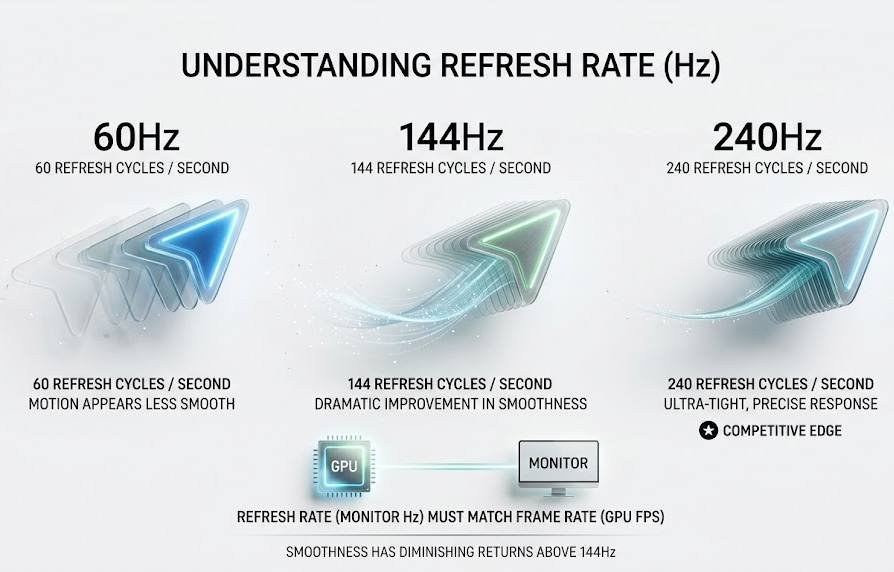
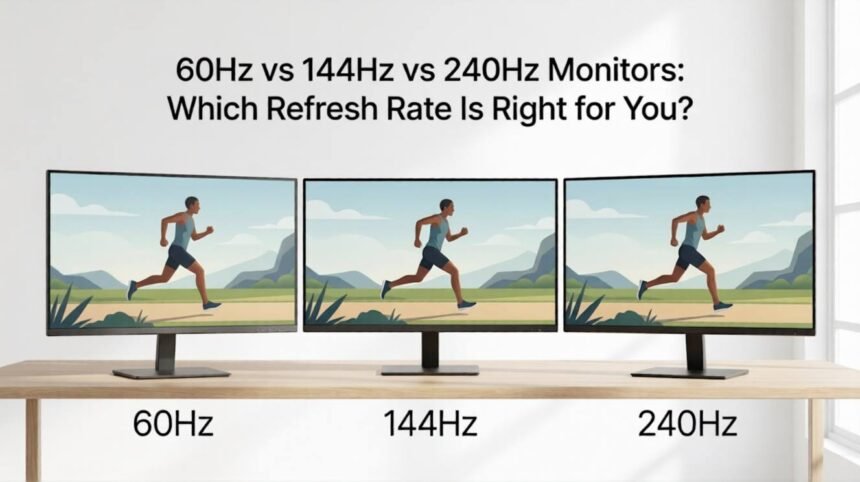
Refresh rate is the number of times your monitor redraws the image on screen each second, measured in hertz (Hz). A 60Hz display refreshes 60 times per second. A 240Hz display refreshes 240 times per second. Each additional refresh cycle gives the screen a new frame from your GPU, so the higher the refresh rate, the more frames can be shown per second, and the smoother the motion appears.
Two things to understand immediately:
1. Refresh rate and frame rate are a pair. Your GPU produces frames; your monitor displays them. A 240Hz monitor running at 60 FPS looks identical to a 60Hz monitor at 60 FPS. You need both your hardware and your display to be matched for any benefit to appear.
2. Perceived smoothness has diminishing returns. The jump from 60Hz to 144Hz is dramatic and immediately visible to almost everyone. The jump from 144Hz to 240Hz is real, but subtler; it matters most in competitive scenarios where reaction time is directly tied to performance.
Blur Busters has published some of the most thorough independent research on how perceived motion clarity scales with refresh rate. It is the best starting point if you want to go deep on the science.
Three Tiers: Head-to-Head Comparison
| Specification | 60Hz | 144Hz | 240Hz |
| Frame interval | 16.7 ms | 6.9 ms | 4.2 ms |
| Visible smoothness jump from baseline | — | Very large | Noticeable |
| Min. GPU needed (1080p) | Budget (GTX 1650) | Mid-range (RTX 3060) | High-end (RTX 4080) |
| Price range (24–27″) | $80–$180 | $150–$350 | $300–$600+ |
| Best for | Casual / office / console | Most PC gamers | Competitive multiplayer |
| Adaptive sync value | Moderate | High | Essential |
| Power consumption (typical) | Low | Medium | Medium–High |
60Hz: Mainstream Baseline
Most laptops, office monitors, budget televisions, and entry-level phones still ship at 60Hz, and for the majority of computing tasks, it remains entirely adequate. Web browsing, document work, video streaming, and casual single-player gaming all run perfectly well at 60 frames per second.
Best suited for:
- Office and productivity users who spend most of their screen time in documents, spreadsheets, or browsers
- Console gamers on older hardware (PS4, Xbox One) that targets 30–60 FPS
- Home theatre setups where content is 24–60 FPS by nature
- Anyone on a strict budget who needs to prioritize GPU or RAM over the display
Honest limitations: Once you have used a 144Hz monitor for more than a few days, returning to 60Hz feels noticeably sluggish, especially during fast mouse movement and scrolling. If you ever intend to upgrade your gaming setup, skipping the 60Hz tier entirely and starting at 144Hz is almost always the better long-term investment.
144Hz: The Sweet Spot for Most Gamers
The jump from 60Hz to 144Hz is the single biggest perceptible refresh rate upgrade available. Motion becomes visibly smoother, aiming in shooters feels sharper, and fast-paced content is simply more comfortable to watch. This tier has also become remarkably affordable; 1080p 144Hz IPS panels from reputable brands now regularly appear under $180, and 1440p 144Hz monitors sit between $250 and $400.
Best suited for:
- PC gamers who play a mix of single-player, multiplayer, and competitive titles
- Anyone upgrading from 60Hz for the first time
- Content creators who also game — 144Hz is smooth enough to feel great, and does not demand elite GPU hardware
- Esports players on a mid-range GPU who want 100+ FPS consistently
Hardware requirement: To genuinely hit 144 FPS, you need a mid-to-upper-mid-range GPU. At 1080p, cards like the RTX 4060 or RX 7600 achieve 144+ FPS in most modern titles. At 1440p, you will need something closer to an RTX 4070 or RX 7800 XT for demanding AAA games. Check recent GPU benchmarks at Digital Foundry or Gamers Nexus to verify your specific hardware.
Recommended panel types at 144Hz:
| Panel | Strengths | Weaknesses | Best Use |
| IPS 144Hz | Great colour, wide viewing angles | Mild backlight bleed | All-rounder, best default choice |
| VA 144Hz | Excellent contrast, deep blacks | Slower pixel response, ghosting risk | Dark game environments |
| TN 144Hz | Fastest response time, cheapest | Narrow viewing angles, poor colour | Pure competitive gaming |
| OLED 144Hz | Perfect blacks, near-zero response | Burn-in risk, expensive | Premium all-rounder |
240Hz: Competitive Tier
Two hundred and forty hertz is purpose-built for competitive multiplayer gaming. The frame interval drops to 4.2 milliseconds — meaning your monitor can show a brand-new frame of information more than twice as often as 60Hz. That difference is measurable in reaction time. NVIDIA’s research, published alongside the Reflex platform, demonstrated a direct correlation between higher frame rates, lower system latency, and improved aiming precision in competitive titles.
The visual difference between 144Hz and 240Hz is subtler than 60→144Hz but absolutely present, especially in games with fast camera movement. More importantly, the input lag improvement is real and consistent. At 240Hz, the theoretical minimum input lag from the display alone drops from ~6.9 ms to ~4.2 ms, a 40% reduction that stacks with GPU, CPU, and peripheral latency savings.
Best suited for:
- Players of fast-paced competitive titles, CS2, Valorant, Apex Legends, Fortnite, and Overwatch 2
- Anyone who already owns a high-end GPU and CPU capable of sustained 200+ FPS
- Professional or semi-professional esports players where every millisecond is meaningful
- Streamers who play and commentate simultaneously and need ultra-smooth visual feedback
Hardware requirement: 240Hz is demanding. To reach 200+ FPS consistently in modern competitive titles at 1080p, you need a top-tier GPU such as the RTX 4080/4090 or RX 7900 XTX, paired with a fast CPU. If your hardware currently sits around 100–120 FPS in competitive games, 240Hz will not deliver its full benefit; 144Hz will serve you better for now.
When 240Hz is overkill:
- Slow-paced single-player RPGs, strategy, or simulation games
- Any GPU/CPU combo that cannot sustain 180+ FPS
- Users who also use the monitor heavily for content creation or color-critical work
Beyond Refresh Rate: The Specs That Matter Just as Much
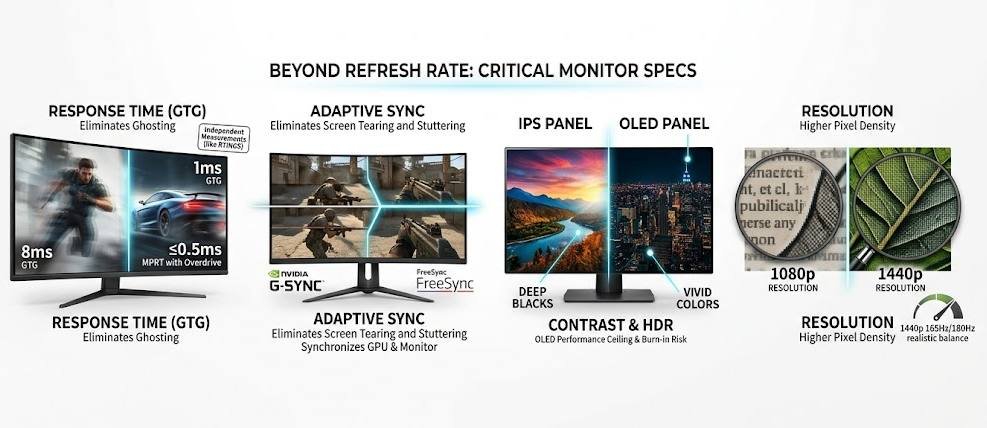
Refresh rate is one number on a spec sheet. These factors are equally important in real-world use:
Response time (GTG grey to grey): This is how fast a pixel can change color. A 240Hz monitor with a slow 8ms response time will produce visible ghosting on moving objects, negating the refresh rate advantage. For 144Hz, aim for ≤1ms GTG. For 240Hz, look for ≤0.5ms or “1ms MPRT” with overdrive. RTINGS measures actual response times independently, always check their tests, not manufacturer claims.
Adaptive sync (G-Sync / FreeSync): When your GPU produces frames at a variable rate, adaptive sync eliminates screen tearing and stuttering by synchronizing the monitor’s refresh cycle to the GPU output. At 144Hz and above, this technology becomes essential; without it, dips below the monitor’s refresh rate produce noticeable judder. NVIDIA GPUs work best with G-Sync or G-Sync Compatible monitors; AMD GPUs use FreeSync. Many modern monitors support both.
- Panel type: See the table above. IPS panels are the safest all-around choice for most users. OLED panels represent the current performance ceiling but carry burn-in risk with static content.
- Resolution: Higher refresh rate and higher resolution compete for GPU resources. A 1080p 240Hz monitor is easier to feed than a 1440p 240Hz monitor. If you want 1440p and maximum smoothness, a 165Hz or 180Hz panel at that resolution is often the most realistic balance for mid-range hardware.
- Contrast ratio and HDR: For film, photography, and single-player immersive games, contrast and color accuracy matter far more than refresh rate. A 60Hz OLED with 1,000,000:1 contrast looks dramatically better in cinematic content than a 240Hz TN panel with 600:1 contrast.
More detailed panel measurements and head-to-head comparisons are published by RTINGS, TechPowerUp, and Hardware Unboxed on YouTube.
Decision Framework: Which Refresh Rate Is Right for You?
Answer these four questions:
1. What do you mainly use your monitor for?
| Primary Use | Recommended Refresh Rate |
| Office, productivity, web, video | 60Hz (or 75Hz) |
| Casual single-player gaming | 60–144Hz |
| Mixed gaming (single-player + multiplayer) | 144Hz |
| Competitive FPS/TPS multiplayer | 144Hz minimum, 240Hz ideal |
| Professional esports / low-latency obsessive | 240Hz or 360Hz |
2. What FPS does your current hardware produce?
- Check your in-game FPS counter or run a benchmark in your most-played titles. Upgrading to a 240Hz monitor while your system runs at 80 FPS is money wasted. Invest in a GPU first, monitor second.
3. What is your budget for the whole system?
- If your total upgrade budget is limited, prioritise GPU over the monitor. A mid-range GPU feeding a 144Hz panel will look and feel better than an old GPU connected to a 240Hz display.
4. Do you play games where reaction time gives a measurable advantage?
- If the honest answer is no, you play story games, strategy titles, or RPGs, then 144Hz is the ceiling of what you will perceive as meaningful. Spend the 240Hz premium elsewhere.
Quick Recommendations by User Type
- The office and media user → 60Hz IPS, 1080p or 1440p. Spend on panel quality and ergonomics, not refresh rate. Look at the Dell UltraSharp range or LG’s IPS lineup.
- The all-around PC gamer → 144Hz IPS or OLED, 1080p or 1440p. This hits the best value-per-Hz ratio on the market right now. RTINGS’ best 144Hz picks are updated regularly and trustworthy.
- The competitive multiplayer player → 240Hz IPS or OLED, 1080p. Prioritize response time and adaptive sync. Cross-reference Blur Busters’ motion clarity rankings before buying.
- The enthusiast who wants everything → 240Hz or 360Hz OLED, 1440p. Budget accordingly; this tier starts at roughly $700 and climbs steeply.
Conclusion
Refresh rate is a meaningful specification with a clear hierarchy of benefits, but those benefits are conditional on matching hardware, game type, and use case. The 60-to-144Hz leap is the most impactful upgrade in the entire monitor market and delivers value to almost every PC gamer. The 144-to-240Hz leap is real but targeted, rewarding competitive players who already have the GPU and CPU to sustain 200+ FPS. Start by benchmarking your current frame rates, then match the monitor to what your hardware can actually deliver. That approach will get you the smoothest possible experience without paying for hertz that your system or your game library can never exploit.