
Frame rate and refresh rate sound like the same thing, and many people use them interchangeably. In reality, they describe two different parts of how motion appears on your screen. Understanding the difference is essential if you want smoother visuals, better gaming performance, or smarter hardware upgrades.
Defining Frame Rate
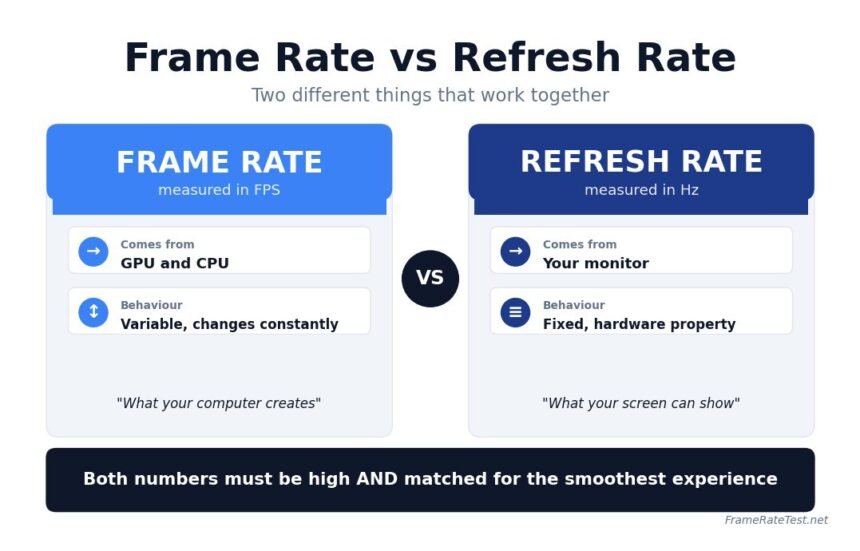
Frame rate refers to how many complete images your system generates every second. It is measured in frames per second, commonly written as FPS.
Your GPU is mainly responsible for producing frames, while the CPU and memory support the process. Every frame is a full image, and when these images are displayed rapidly, they create the illusion of motion.
Frame rate is not constant. It changes depending on several factors:
- Graphics settings in games or applications
- Scene complexity, such as lighting, shadows, and movement
- Hardware performance, including GPU and CPU power
- Background processes running on your system
For example, a game might run at 120 FPS in a simple scene but drop to 50 FPS during intense action. This fluctuation is normal and one of the key challenges in maintaining smooth performance.
Higher frame rates generally result in smoother motion and better responsiveness. This is especially noticeable in interactive tasks such as gaming, where each frame reflects user input.
Defining Refresh Rate
Refresh rate describes how many times your display updates per second. It is measured in hertz, written as Hz.
Unlike frame rate, refresh rate is a fixed specification of your monitor, phone, or TV. A 60Hz display refreshes 60 times per second, while a 144Hz display refreshes 144 times per second.
Refresh rate determines the maximum number of frames your screen can show. Even if your system generates more frames, the display cannot show beyond its refresh limit.
Modern devices often offer higher refresh rates for smoother visuals. Many smartphones now support 90Hz or 120Hz, and gaming monitors commonly reach 144Hz, 165Hz, or even 240Hz.
A higher refresh rate improves visual clarity during motion. Scrolling feels smoother, animations look cleaner, and fast-moving objects are easier to track.
Core Difference in Simple Terms
Frame rate is what your system creates. Refresh rate is what your display can show.
Both must work together to produce a smooth experience. If either one is limited, the overall result is affected.
Think of frame rate as the supply of images and refresh rate as the delivery system. If one is faster than the other, performance becomes inefficient or uneven.
What Happens When They Do Not Match
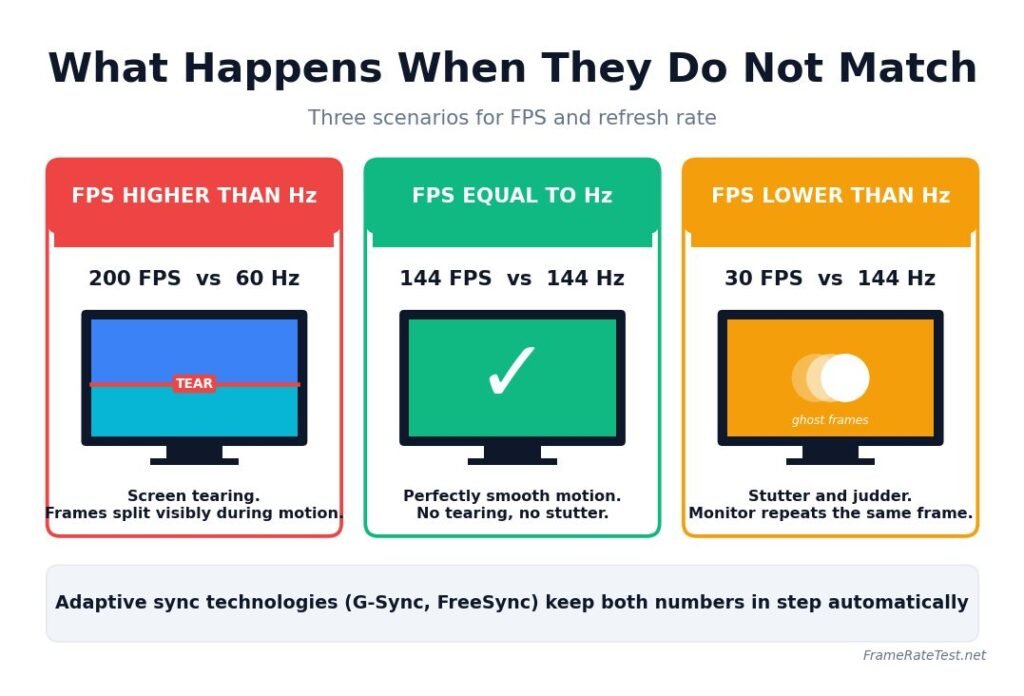
Understanding mismatches is where most users gain real clarity. This is also where performance issues become visible.
Frame Rate Higher Than Refresh Rate
When your GPU produces more frames than your monitor can display, the extra frames are not fully used. This often leads to screen tearing.
Screen tearing happens when parts of multiple frames appear on the screen at the same time. It usually shows up as a horizontal split, especially during fast motion.
This situation is common when:
- Playing games with very high FPS on a lower refresh monitor
- Disabling synchronization features like V-Sync
While high FPS still improves responsiveness, visual consistency can suffer.
Frame Rate Lower Than Refresh Rate
When the frame rate is lower than the refresh rate, the monitor repeats frames until a new one arrives. This creates stutter or uneven motion.
For example, running a game at 30 FPS on a 144Hz monitor does not feel smooth. The display is capable of high performance, but the system cannot supply enough frames.
This mismatch is common when:
- Running demanding games on weaker hardware
- Using high-resolution settings that reduce performance
The result is a less fluid experience despite having a high refresh rate display.
Frame Rate Equal to Refresh Rate
This is the ideal situation. Each refresh cycle displays a new frame, resulting in smooth and consistent motion.
When frame rate matches refresh rate:
- Motion appears fluid
- Input response feels immediate
- Visual artifacts like tearing are minimized
Achieving this balance is the goal of most optimization techniques and display technologies.
Why a High Refresh Monitor Alone Is Not Enough
Many users assume that upgrading to a high refresh rate monitor will automatically improve smoothness. This is not always true.
A high refresh display only shows its full potential when paired with hardware capable of producing high frame rates.
For example:
- A 240Hz monitor paired with a system producing 60 FPS will still feel like 60 FPS
- A 144Hz monitor with a stable 120 FPS will feel significantly smoother
This is why balanced upgrades matter. Investing in a powerful GPU often delivers more noticeable improvements than upgrading the monitor alone.
Real Examples That Make It Clear
Understanding theory is helpful, but real scenarios make the difference easier to see.
Casual Use
For browsing, watching videos, and office work:
- 60 FPS and 60Hz are usually sufficient
- Higher refresh rates improve scrolling smoothness, but are not essential
Console Gaming
Most modern consoles target:
- 30 FPS for cinematic experiences
- 60 FPS for smoother gameplay
- Some newer titles support 120 FPS on compatible displays
Competitive PC Gaming
In fast-paced games like shooters:
- 120 FPS or higher improves reaction time
- 144Hz or higher monitors provide smoother tracking
- 240Hz setups are preferred by professional players
Here, both high FPS and high refresh rate provide measurable advantages.
How to Check Your FPS and Refresh Rate
Knowing your numbers helps you understand your system performance.
To check frame rate:
- Use in-game FPS counters
- Enable overlays from GPU software
- Use browser-based tools for quick testing
To check refresh rate:
On Windows:
- Open Settings
- Go to System
- Select Display
- Click Advanced display settings
On macOS:
- Open System Settings
- Select Displays
- Check refresh rate options
On smartphones:
- Go to Display settings
- Look for refresh rate or motion smoothness options
Adaptive Sync Makes Everything Better
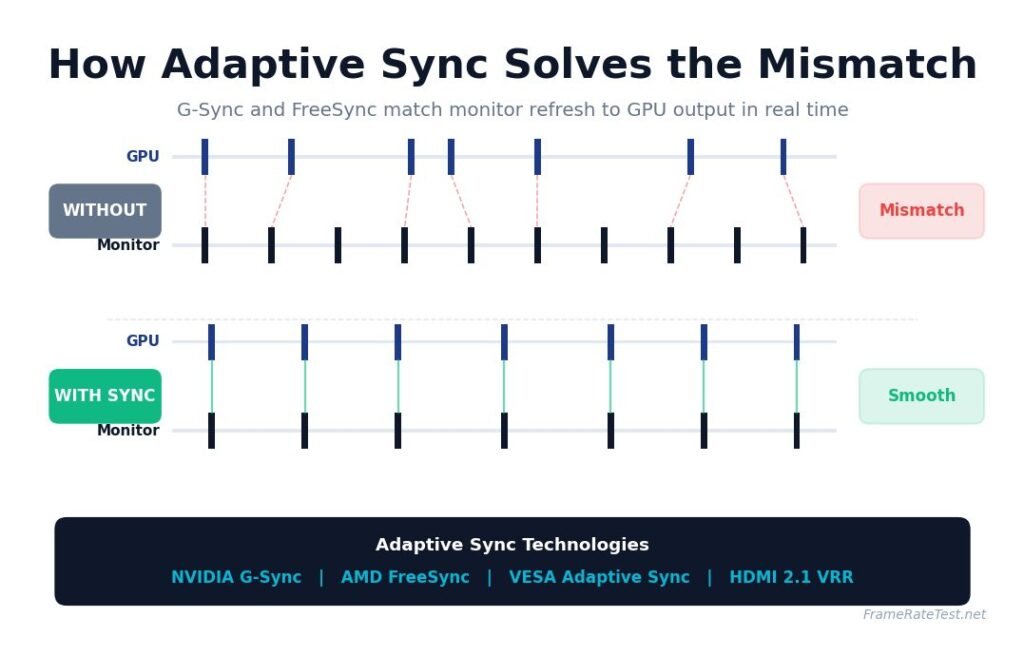
Modern displays include technologies that help match frame rate and refresh rate dynamically.
Popular options include:
- NVIDIA G-Sync
- AMD FreeSync
These technologies adjust the monitor’s refresh rate in real time to match the GPU’s frame output.
Benefits include:
- Reduced screen tearing
- Smoother motion during frame drops
- Better overall visual stability
Adaptive sync is especially useful when the frame rate is inconsistent, which is common in demanding games.
Practical Tips to Get the Best Experience
If you want smoother visuals without wasting money, focus on these points:
- Match your monitor refresh rate with realistic FPS targets
- Lower game settings if needed to maintain stable frame rates
- Enable adaptive sync if your monitor supports it
- Avoid chasing extremely high FPS if your display cannot show it
- Upgrade GPU performance before upgrading to ultra-high refresh displays
Small adjustments often lead to noticeable improvements.
Conclusion
Frame rate and refresh rate are closely connected but fundamentally different. Your system controls frame rate and determines how many images are created each second. Your display controls refresh rate and determines how many of those images you actually see.
For the best experience, both should be balanced. High frame rates combined with high refresh rates deliver the smoothest and most responsive visuals. Understanding this relationship helps you make better decisions when upgrading hardware, adjusting settings, or troubleshooting performance issues.